
After Oura on the Web: explore your Oura history on a computer
Oura on the Web ended on 5 October 2026. Here is what remains, how to keep a copy of your data, and how to explore your Oura history on a big screen.
Updated · By Jakub Had, maker of Daytlas
What happened to Oura on the Web?
Oura on the Web was Oura’s browser dashboard for your ring data. Oura discontinued it on 5 October 2026. Oura’s support article says your data is still available in the Oura app and the Membership Hub. What remains:
- The Oura app syncs your ring and shows your data on your phone.
- The Membership Hub is where you request a full export of your data (Oura’s export instructions).
- The Oura API lets apps you approve read your data (Oura’s API article).
If you used the web dashboard to look at weeks and months at once, the routes below still let you do that on a computer.
How to see your Oura history on a computer
- Connect with Oura. Select Connect with Oura, sign in on Oura’s website and choose which records to share. Your history opens in your browser, with nothing to install. Oura says Gen3 and later users without an active Oura Membership can’t access their data through the Oura API (The Oura API).
- Or import your Oura export. In the Membership Hub, select Export data, then Request your data. Oura says this works with or without an active membership and can take up to 10 days (Export & Share Your Oura Data). When Oura emails you that it is ready, download it and import it into Daytlas: a CSV, or a ZIP of up to 10 MB. The file is read in your browser and is not uploaded. An import brings in your daily sleep, readiness and activity values; Tag Lab and intraday heart rate need a connection.
- Explore. Start with Overview for your recent weeks, open any day in Day detail, then pick a period in Trends and add a second metric. Keep the Oura app for syncing your ring and your daily check-in.
Your options after 5 October
There is more than one way to keep working with your Oura history. This overview is based on each maker’s own description, checked on . It is not a ranking, and I haven’t tested every tool hands-on. A feature not listed is unverified, not missing. I make Daytlas, so read its row with that in mind.
One rule applies to every route that reads the Oura API, Daytlas included: Oura says Gen3 and later users without an active membership can’t access their data through it. The Membership Hub export works with or without a membership.
| Route | How it works | Cost and requirements | Source |
|---|---|---|---|
| Oura appPhone app, by Oura | Syncs your ring. Oura says your data is still available there. Shareable Reports give a PDF summary of sleep and daily movement to share with a health professional. | Oura says Shareable Reports work on Gen2, or on Gen3 and later with an active membership. | Oura: Oura on the WebChecked 6 Oct 2026Oura: Export & Share Your Oura DataChecked 6 Oct 2026 |
| Membership Hub exportAny browser, then your own files | Request a full export of your Oura data, then open it in a spreadsheet or another tool. Durations in the files are in seconds. | Oura says it works with or without an active membership and can take up to 10 days. | Oura: Export & Share Your Oura DataChecked 6 Oct 2026 |
| DaytlasBrowser dashboard, made by me | Connect with Oura or import your export. Readings pass through Daytlas’s server to your browser, which stores them. Day detail, Overview, Trends, Your Year, Tag Lab and CSV or JSON export. It doesn’t show workouts, daytime stress, resilience or VO2 max. | Core features are free forever. Importing an export works without an Oura connection. | Daytlas: PrivacyChecked 6 Oct 2026 |
| Ring PulseBrowser dashboard | Its maker describes a browser app that connects to the Oura API through a lightweight proxy and caches your data in the browser, with daily views, correlations and CSV export. | Free, according to its maker. | Ring Pulse maker’s postChecked 6 Oct 2026 |
| VitraDesktop app | An app for macOS 12 or later and Windows 10 or 11 that reads your Oura data on your own computer and stores everything locally. | One-time €19 for one device or €29 for three, with a 7-day trial, according to its maker. | Vitra: homepageChecked 6 Oct 2026 |
| FreeRepsSelf-hosted | An open-source server you run on your own hardware, for example with Docker Compose. It syncs Oura through the Oura API next to other sources such as Apple Health. | Open source under the MIT licence. You host and maintain it yourself. | FreeReps: homepageChecked 6 Oct 2026 |
You can also write your own: Oura says its API can fetch your own data, and you need an Oura account and an API application (The Oura API). Prices and features change, so check each maker’s page before you choose.
What you can see in Daytlas
- Day detail: one day in depth, with readiness and sleep contributors, overnight heart rate and HRV, and the day’s activity intensity.
- Overview: your latest scores, and recent weeks in the context of your own history.
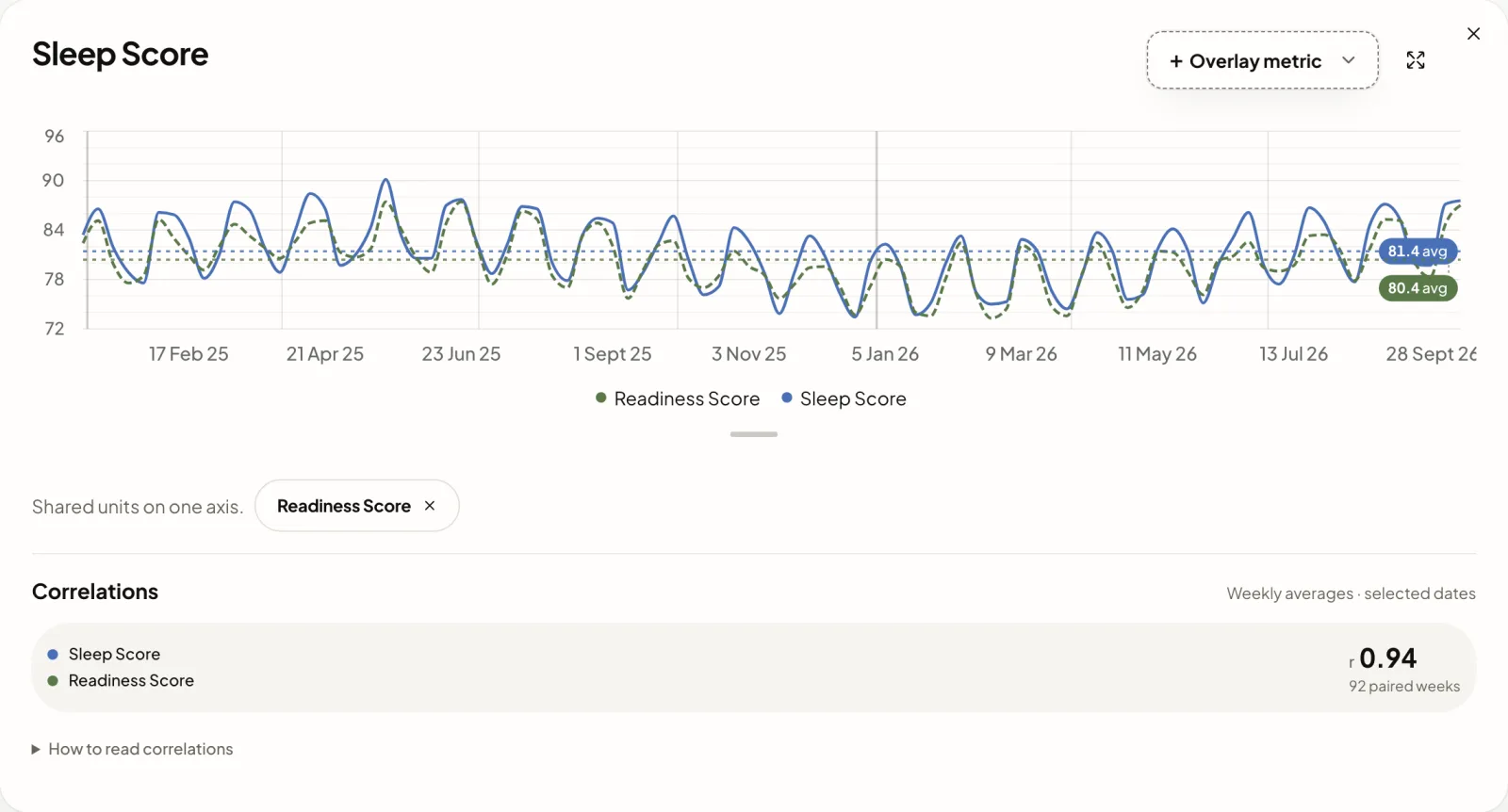
- Trends: the period you choose, averaged daily, weekly, monthly, quarterly or yearly, with a second metric overlaid. For two metrics you see a correlation value and how many paired values it rests on. It appears from five pairs, and gaps are never filled in. A correlation is not proof of cause.
- Your Year: a whole year of sleep, readiness and activity at a glance.
- Tag Lab: compare the days after a tag you add in Oura with your other days. Each comparison shows its sample size.
- Export: download your readings as CSV or JSON.
Daytlas focuses on sleep, readiness and activity, and on giving your history room. It doesn’t show workouts, daytime stress, resilience or VO2 max, and it doesn’t diagnose anything. Its export is a working copy of the readings it holds, not a complete archive of your Oura account, so keep Oura’s export for that.
Where your data goes
When you connect Oura, your readings travel from Oura through Daytlas’s server to your browser. Your browser stores them and runs the analysis. An imported file is read in your browser.
Your Oura connection key is encrypted and kept in a secure cookie that no script can read. Everything travels over HTTPS. Daytlas keeps no health database on its servers.
Your browser holds your copy, so another browser or device needs its own connection or import. Clearing site data removes it. You can disconnect and clear local data at any time. How your data is handled
Why I built Daytlas
I’m Jakub Had, a product builder from Slovakia, and I wear an Oura ring. I always missed a big-screen view of my history. In the app, everything sits on a small phone screen. So I built the dashboard I always wanted, cared about the details, and kept the core features free forever.
Frequently asked questions
Can I still use Oura on the Web?
Can I see my Oura history on a computer?
Is Daytlas free?
Do I need to connect my ring?
How do I export my Oura data now?
Where is my health data stored?
Is Daytlas made by Oura?
Bring your Oura history to a bigger screen.
Oura says your data is still available in the app and the Membership Hub. Connect your account or import your export, and read months of it at once.
Sources, checked
- Oura Member Care: Oura on the Web · last updated 5 October 2026
- Oura Member Care: Export & Share Your Oura Data · last updated 5 October 2026
- Oura Member Care: The Oura API · last updated 1 October 2026
- Keegan Donley: the post introducing Ring Pulse · published 18 July 2026
- Vitra: homepage · undated
- FreeReps: homepage · undated
Daytlas is an independent product and is not affiliated with or endorsed by Ōura Health Oy. Oura names and marks belong to their respective owners. Not medical advice.